
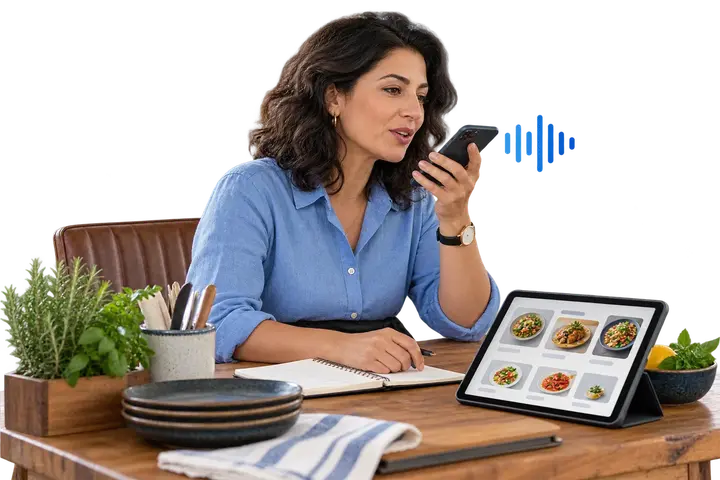
A restaurant owner sees a speaking person and an audio waveform on a phone screen in an advertisement and searches for an AI menu bot. What does that actually mean? With Nina GO AI, the useful starting point is the work behind the menu: finding a dish, changing information, preparing translations and shaping what guests see. The assistant connects a request with supported tools in the restaurant system. Understanding that connection makes the technology easier to evaluate than a promise that artificial intelligence will somehow run the whole restaurant.
What an AI menu bot does
A digital menu presents dishes, descriptions and prices. An AI menu assistant adds a conversational way to work with that information. Instead of remembering the location of every setting, an authorised member of the team can describe a supported task in ordinary language. The task still concerns real products and the restaurant's own content. This is what distinguishes useful assistance from an impressive paragraph that has no connection with the menu being sold.
Nina GO AI brings menu management, screen presentation and supported restaurant workflows into the same environment. The assistant can help navigate that environment through text and available voice functions. In this article, menu bot means an assistant for the operator and team. It should not be confused with a promise that every guest can hold a conversation with an autonomous waiter or that every spoken request immediately becomes a published change.
From a spoken request to a clear result
Imagine a small restaurant preparing its lunch service. The owner wants to find the soup entry, improve its description and check the current price before opening. A sensible first request identifies the dish precisely. The team can then inspect what the assistant has found and ask for a specific next step. Each request has a visible purpose, so the conversation remains connected with an actual part of the business.
The important moment is seeing the proposed result. A fluent answer alone does not prove that the intended product was selected or that publication has happened. Nina GO AI's supported change workflows include preview and control mechanisms; some behaviour also depends on permissions and configuration. The practical habit is simple: identify the item, review the intended change and check the published menu when the operation is complete. The owner stays responsible for the commercial offer.
Why speaking can fit restaurant work
Restaurant knowledge is often spoken before it is written. The chef explains a preparation change, the manager decides what to promote and the team notices that a description causes questions. Voice can make it easier to turn those observations into a concrete request. It is particularly useful when the operator knows what needs doing but does not want to search through a long interface to find the relevant place.
Good voice use is deliberate. Choose a quieter moment, name the exact product and make the desired action explicit. Asking to show a dish before changing it can be more helpful than giving a long instruction covering several unrelated jobs. When the room is noisy or wording needs precision, text remains a useful alternative. The microphone is another way into the workflow, while the menu itself remains the shared reference for the team.
One product, several useful presentations
The same dish may need a clear description for a guest's phone and an appealing presentation on a restaurant display. Nina GO AI supports menu and screen work within a connected software environment. That can reduce the need to invent a separate description and price story for every presentation. The operator still chooses the relevant products, layout and publishing context rather than assuming that every channel must show everything.
AI can also assist with supported translation and media tasks. These functions require the appropriate setup, permissions and, where applicable, generation credits or provider readiness. A generated food image is an illustration and should represent the actual offer honestly. A translated description needs the same portion, ingredients and meaning as the original. Useful automation begins with accurate product information, not with the number of attractive outputs a tool can create.
A practical first demonstration
For a useful demonstration, bring a real section of your own menu. Select a familiar dish with a clear name, price and description. Ask to locate it, try a supported change in a reviewable context and inspect how the result appears. This small exercise reveals whether the assistant understands the intended item and whether the team can follow the operation without guessing what happened in the background.
Include a realistic correction in the demonstration. If the selected dish is wrong or the description needs different wording, the team should know how to refine the request. Also clarify which voice languages are available in the chosen setup. The languages used for stored menu texts, the website interface and speech recognition are different capabilities. A translated menu does not by itself guarantee that every assistant function is available in every language.
A more useful way to think about the technology
The strongest reason to consider a digital menu with AI is the connection between an everyday intention and a manageable task. A small restaurant does not need a theatrical robot to benefit from that connection. It needs understandable product information, a clear path for making changes and a menu presentation the team can maintain during a normal working week. That is a concrete basis for comparing systems.
If you discovered Nina GO AI on Instagram, start with the task you recognised in the advertisement. Was it speaking to manage a menu, preparing a screen presentation or working on several language versions? Use that task as the first question in your demonstration. Explore the Nina GO AI workflow and discuss your own menu through the contact page. A convincing introduction ends with something your team can inspect and use.



