
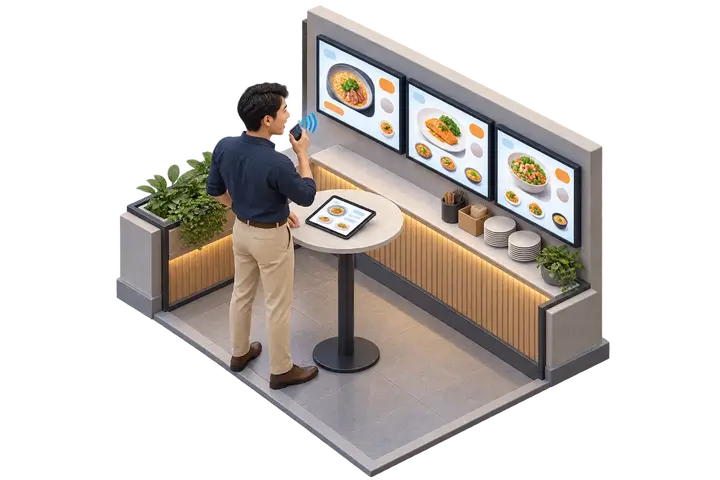
A television above the counter can be a restaurant's most visible menu. Guests look up before ordering, compare dishes and decide whether a special offer interests them. The challenge is keeping that presentation attractive and current when the kitchen and service team already have a full day. A digital menu board with AI assistance addresses the preparation of the content: the products, wording, visuals and selected screen presentation. The intelligence is in the connected software workflow, rather than in a television that somehow understands the restaurant by itself.
Begin with the guest's view
The first design question is what somebody standing at the ordering point needs to understand. Usually that means the main product choices, a clear price and the information that distinguishes one option from another. A menu board should help that decision at a glance. Trying to display every detailed explanation in the same frame can make a large television feel less useful than a carefully organised short list.
Imagine a small lunch counter with a main dish, a vegetarian choice and a drink offer. The owner decides which products deserve attention on the display. Their names and descriptions come from the restaurant's real menu. This keeps the screen close to what the team actually serves. The chosen layout can then give the main offer enough space while allowing the other choices to remain easy to compare.
Let the menu guide the design
Nina GO AI connects menu management with screen content tools and supported design workflows. A product can provide the reference for a screen presentation instead of becoming an unrelated picture with a separately invented price. The operator chooses the relevant menu items, the design context and the intended screen. That connection is useful when the business wants an attractive presentation that it can still recognise and maintain later.
Start with legible names and a sensible hierarchy. The guest should recognise the food before noticing decorative effects. Images can make the offer appealing, while text explains what the image alone cannot communicate. Look at the design from the real viewing position. A composition that looks elegant close to a laptop may need larger text or fewer elements when it sits above a busy service counter.
Use voice to describe a concrete content task
Speaking is a natural way for a restaurant owner to express what should change. The useful request names the product, the desired content and the intended presentation. For example, the owner can ask for help preparing a description or a supported menu change before arranging the related screen content. Clear requests give the assistant something specific to work with and make the result easier for the team to inspect.
Nina GO AI's text and available voice functions connect with supported assistant tools. The exact actions depend on the configured permissions and setup. A demonstration should show the path from the spoken intention to the reviewable result and then to the relevant published presentation. The practical benefit is a more direct way to prepare work, with the operator able to see which product and screen are involved.
Make food visuals useful and believable
An appealing dish image can give a screen a strong focal point. AI image and video tools can support content preparation where the required provider, credits and permissions are available. Start by describing the real offer and how the material will be used. A single product image needs different framing from a background or a short promotional clip. Clear purpose helps the team choose the right output.
The published visual should remain faithful to the food the guest can order. Keep recognisable ingredients, portion expectations and product identity aligned with the actual dish. Where an AI visual is an illustration, treat it accordingly. A beautiful screen is most convincing when the team can confidently explain the offer beneath it. Honest product presentation is part of the restaurant's brand, not a detail to add after the design is complete.
Plan the right offer for the right moment
A breakfast selection and a lunch offer have different roles during the day. Nina GO AI includes supported screen campaign scheduling with product or combination targets. The selected schedule and screen assignment matter as much as the graphic. A relevant offer can receive attention in its intended period, while the business keeps the underlying product and its published price connected with that presentation.
When preparing a campaign, inspect the target product or combination, the chosen days and times and the destination screen. The campaign's displayed selling price follows its menu target rather than becoming an independent secret price list. This makes it easier to maintain a coherent offer. The restaurant still decides what it wants to promote and when the presentation should appear within the supported scheduling workflow.
Evaluate the complete screen experience
A useful demonstration includes the screen arrangement your business actually needs. Bring an example menu, identify a product to feature and follow a content change through to the relevant display. Check image proportions, text readability and how the presentation works at the counter. Also discuss the screen hardware, player setup, connectivity and assignment rather than assuming that any television configuration will behave in the same way.
A digital menu board succeeds when it becomes part of a routine the team can maintain. The chef's daily idea, the manager's chosen offer and the guest's first glance can meet in one clear presentation. Explore the Nina GO AI solutions and use the contact page to discuss your own screens. Ask for a demonstration that begins with your food and ends with a menu board your guests can understand.



